
How to Use Google Hotels: Prices, Locations & Bookings
Google Hotels helps travelers find accommodation, compare prices across booking websites, explore hotel locations, and choose a stay that suits their budget and travel plans. Instead of visiting multiple hotel websites one by one, you can use Google Hotels to compare available options for your destination and dates, then continue to a hotel or booking partner’s website to complete your reservation.
Whether you are planning a weekend getaway, a business trip, or a longer holiday, knowing how to use Google Hotels can make the hotel-search process easier. This guide explains how to search for hotels, compare prices, use location filters, review amenities, identify deals, track price changes, and complete a booking.
What Is Google Hotels?
Google Hotels is a hotel-search and comparison tool available through Google Travel. It gathers accommodation options and rates from hotels, online travel agencies, and other booking partners, allowing travellers to compare options in one place.
You can explore hotel photos, guest ratings, amenities, locations on a map, and available prices for your selected dates. Google Hotels is primarily a comparison and discovery tool; when you select a booking offer, you are generally redirected to the hotel or booking partner’s website to finish the reservation.
How to Access Google Hotels
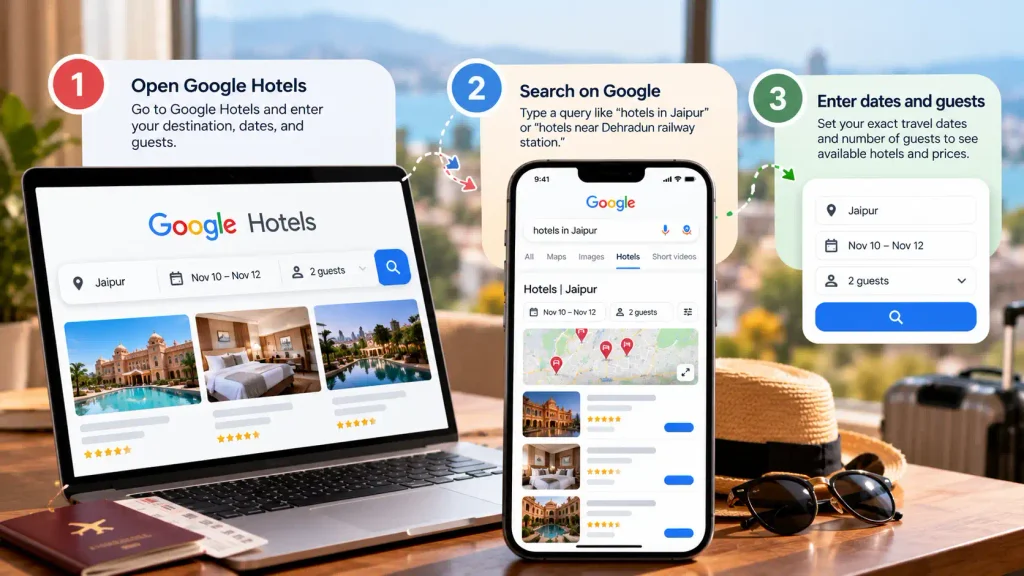
You can open Google Hotels directly or find it through a regular Google search. No separate app is required to begin searching.
Option 1: Open Google Hotels
Visit Google Hotels and enter your destination, travel dates, and number of guests.
Option 2: Search on Google
Type a query such as “hotels in Jaipur” or “hotels near Dehradun railway station.” Open the hotel results to explore available properties and prices.
Once the results appear, enter your exact dates and guest details before comparing offers. Rates and availability can change depending on the dates, room type, and number of guests.
How to Use Google Hotels Step by Step
Follow these steps to narrow down your choices and find accommodation that matches your needs.
Step 1: Enter Your Destination and Travel Dates
Start by entering the city, neighbourhood, landmark, or specific area where you want to stay. Choose your check-in and check-out dates, then specify the number of adults, children, and rooms.
Accurate dates matter because hotel prices and availability can vary significantly between weekdays, weekends, holidays, and major local events. If your travel dates are flexible, compare nearby dates to see whether a small change could reduce the cost.
Step 2: Browse the Hotel Results
Google Hotels displays accommodation options based on your search. Depending on the property and available data, listings may include photographs, guest ratings, nightly prices, amenities, and location details.
Open individual listings to review more information before deciding. Results are not necessarily arranged from cheapest to most expensive by default, so use the available sorting and filtering options to make comparisons relevant to your priorities.
Step 3: Apply Filters to Narrow Your Search
Filters help you remove properties that do not meet your requirements. Instead of reviewing every listing, select the features that matter most to your trip.
Common options may include:
- Price: Set a budget or narrow the results to a suitable price range.
- Guest ratings: Focus on properties with stronger guest feedback.
- Hotel class: Compare accommodation by star classification where available.
- Amenities: Look for features such as free Wi-Fi, parking, a pool, or breakfast.
- Location: Focus on hotels near a particular neighbourhood or point of interest.
- Property type: Where offered, narrow your search to particular accommodation types.
Filter availability can vary by destination and search. After applying your choices, check whether the remaining hotels still offer the facilities and room arrangements you need.
Step 4: Use the Map to Compare Locations
A low hotel price may not represent the best value if the property is far from the places you plan to visit. Google Hotels includes a map view that helps you assess where properties are situated.
Use it to compare hotels near transport hubs, offices, tourist attractions, beaches, event venues, or other important locations. Zoom in to explore specific neighbourhoods and open listings to review their addresses and nearby points of interest.
Before booking, confirm the hotel’s exact address and consider transport costs, travel time, and the availability of public transportation. A slightly more expensive hotel in a convenient area may cost less overall once daily travel expenses are included.
Step 5: Compare Prices Across Booking Websites
Open a hotel listing and review the available booking offers. Depending on the property, you may see rates from the hotel’s official website and third-party booking platforms.
Compare the offers carefully rather than selecting the first low price. Check the room category, number of guests, meal inclusions, cancellation terms, taxes, additional fees, and payment conditions.
Google Hotels can make price comparison more convenient, but the displayed price is not a guarantee that an offer will remain available. Always confirm the final amount on the booking website before paying.
Step 6: Check Reviews, Photos, and Amenities
A hotel may look appealing in its main photographs, but the details can affect your actual stay. Review guest feedback and available images to understand the property’s condition, service, location, and facilities.
Pay particular attention to recurring comments about cleanliness, noise, staff service, room size, Wi-Fi, and the accuracy of listing descriptions. Check whether amenities are included in the room rate or available for an extra charge.
If you need a particular facility, such as accessible accommodation, parking, or a family room, verify it with the hotel or booking provider before making a non-refundable reservation.
Step 7: Complete Your Booking
Once you have chosen a hotel and offer, select the relevant booking link. In most cases, this opens the hotel’s website or a third-party booking partner, where you complete the reservation.
Before confirming, review:
- Guest names and the number of occupants.
- Check-in and check-out dates.
- Room type and bed arrangement.
- Total price, including applicable taxes and fees.
- Cancellation and refund conditions.
- Deposit, payment, and check-in requirements.
After booking, save the confirmation email and reservation number. Contact the booking provider or hotel directly if you need to correct details, cancel the stay, or request a special arrangement. The provider that manages the reservation generally handles those changes and refunds.
Must-Read: The Complete Guide to Booking Flights, Hotels, Cars & More
How to Compare Hotel Prices on Google Hotels
Price comparison is one of the most useful features of Google Hotels. However, the lowest displayed rate is not always the cheapest option once all booking conditions are considered.
Illustrative example — not live hotel prices.
| Booking option | Room rate per night | Additional charges | What to check |
| Hotel website | ₹4,000 | ₹500 | Direct-booking benefits and cancellation terms |
| Booking platform A | ₹3,700 | ₹900 | Taxes, fees, and payment conditions |
| Booking platform B | ₹4,200 | ₹0 | Whether the displayed rate includes all mandatory charges |
In this example, the second platform has the lowest advertised room rate, but the hotel website has the lowest total cost at ₹4,500. The actual comparison should always use the final payable amount for the same room, dates, and guest details.
Google’s hotel-search tools can also provide price information and comparisons to help travellers assess whether a rate is relatively high or low. These indicators are useful for research, but they should not replace checking the actual booking terms.
What to Check Before Choosing a Price
- Total cost: Compare the final amount, including mandatory taxes and fees.
- Room type: Make sure you are comparing equivalent rooms and occupancy limits.
- Breakfast: Check whether meals are included in the displayed rate.
- Cancellation: A refundable rate may be worth paying more for if your plans could change.
- Payment terms: Confirm whether you must pay immediately or at the property.
- Special conditions: Review deposits, extra-bed charges, and other restrictions.
How to Find the Best Hotel Locations
Google Hotels can help you compare properties across a city, but choosing the right location depends on your reason for travelling. A central hotel may be ideal for sightseeing, while a property near an airport or business district may be more practical for a short work trip.
Don’t Miss Out!: The Complete Guide of Hotels & Restaurants Locations, Amenities, Loyalty
Choose a Location Based on Your Trip
- For sightseeing: Search near the attractions you intend to visit and compare walking distances and transport connections.
- For business travel: Focus on hotels close to your office, conference venue, or meeting location.
- For airport stays: Search near the airport and confirm whether the hotel offers a shuttle or convenient transport.
- For family holidays: Check access to restaurants, shops, transport, and family-friendly facilities.
- For budget trips: Explore nearby neighborhoods rather than limiting your search to the most popular tourist areas.
Use the map to understand the hotel’s surroundings, then confirm the exact location on the property’s website or another reliable map service. Travel times can vary with traffic, public transport schedules, and the time of day.
How to Find Hotel Deals on Google Hotels
Google Hotels may display labels such as “Deal” or “Great deal” when a rate compares favourably with historical prices or similar nearby properties. These indicators can help you identify options worth investigating, but they do not guarantee the lowest price available.
To improve your chances of finding a suitable deal:
- Compare prices across multiple booking providers.
- Check nearby dates if your travel schedule allows flexibility.
- Search neighbouring areas to see whether similar accommodation costs less.
- Compare the official hotel website with third-party offers.
- Review the final price and cancellation policy before paying.
- Consider the total cost of transport and other expenses, not just the room rate.
Google also provides tools that can help travellers understand typical hotel pricing by location and time of year. Use these insights as a guide when deciding whether to book now or investigate other dates.
How to Track Hotel Prices on Google Hotels
Google has introduced hotel price-tracking features that can notify eligible signed-in users when prices change for selected destinations or individual hotels. Availability and interface details can vary by feature, account, language, and region.
To check whether tracking is available for your search:
- Open Google Hotels and enter your destination and dates.
- Browse the results and select the hotel you are interested in.
- Look for a price-tracking option on the hotel’s overview or prices section.
- If available, enable tracking and follow any on-screen instructions.
- Check your email for alerts and revisit the booking offers if the price changes.
Price tracking can help you monitor rates without repeatedly searching manually. However, an alert does not reserve a room or guarantee that the same price will still be available when you open the booking link.
Is Google Hotels Free to Use?
Yes. Travellers can generally use Google Hotels to search for properties, compare displayed rates, explore locations, and review available hotel information without paying Google a search fee.
However, the hotel reservation itself may involve charges set by the hotel or booking provider. These can include the room price, taxes, deposits, and other applicable fees. Review the payment terms on the final booking page before confirming your stay.
Does Google Hotels Always Show the Cheapest Price?
No. Google Hotels helps you compare rates from participating sources, but it cannot guarantee that every hotel, booking provider, promotional rate, or membership-only offer will appear in the results.
Prices and availability can change, and different offers may have different cancellation conditions or inclusions. For a more reliable comparison, check the hotel’s official website alongside the other available booking options and compare the complete cost for the same stay.
Essential Guide: Best Hotel Booking Sites for Cheap Rates
Tips for Using Google Hotels Effectively
A few simple habits can make hotel searches more efficient and help you avoid booking surprises.
- Enter the correct dates, guest count, and room requirements before comparing prices.
- Use filters to narrow the results instead of relying only on the default ranking.
- Compare the map location with the places you plan to visit.
- Read recent guest reviews and look for recurring concerns.
- Compare equivalent room types and cancellation conditions.
- Check whether breakfast, parking, Wi-Fi, and other facilities are included.
- Review the final price on the booking provider’s website.
- Save your confirmation and review the hotel’s check-in requirements before traveling.
Related: How to Use Google Flights to Find Cheap Prices in 2026!
Conclusion
Google Hotels makes it easier to discover accommodation, compare prices, explore neighborhoods, and review hotel features in one place. By using its filters, map, booking comparisons, and available price-tracking tools, you can make a more informed decision before reserving a room.
For the best results, compare the complete cost rather than just the advertised nightly rate, check the hotel’s location and reviews, and carefully review the booking terms. Google Hotels can simplify your search, but confirming the final details with the hotel or booking provider remains an essential part of planning your stay.
Frequently Asked Questions
Visit Google Hotels, enter your destination and travel dates, and specify the number of guests. Use filters to narrow your options, compare prices and locations, and select a booking offer that meets your requirements.
Google Hotels generally directs you to a hotel’s official website or a participating booking provider to complete the reservation. The precise booking options depend on the property and the available offers.
Google Hotels displays rates supplied by hotels and booking partners, but prices and availability can change. Confirm the room details, taxes, fees, and final payable amount on the booking website before completing your reservation.
Enter your destination and dates, apply a suitable price filter, compare available booking offers, and explore nearby locations. If your dates are flexible, compare different days and check whether a lower rate comes with different cancellation conditions.
Yes. You can search for a specific area or landmark and use the map to explore nearby properties. Check the hotel’s exact address and transport connections before booking.
Price tracking is available for eligible searches and supported hotel listings. If you see a tracking option, enable it and follow the on-screen instructions. Availability may vary by account, language, and region, and alerts do not guarantee a particular rate.
Yes. Listings may include guest ratings, reviews, photographs, and amenity information. The details available vary by property, so verify important facilities and room conditions before making a reservation.
Cancellation rules depend on the rate you selected and the provider managing your reservation. Check the confirmation email and contact the hotel or booking partner directly to request a cancellation, change, or refund.