
TSA PreCheck Touchless ID: What Travelers Should Know
To enroll in TSA PreCheck Touchless ID, travelers generally need an active TSA PreCheck membership, a Known Traveler Number (KTN), a valid passport, and an eligible account with a participating airline; travelers complete the Touchless ID opt-in through that airline rather than through a separate TSA application.
TSA PreCheck Touchless ID is a voluntary biometric identity-verification option that lets eligible travelers use facial matching at designated security checkpoints instead of routinely presenting a physical government-issued ID. The technology is an extension of the TSA PreCheck experience, not a replacement for TSA PreCheck itself.
The process is relatively straightforward, but there is an important distinction between getting TSA PreCheck and activating Touchless ID. Travelers without TSA PreCheck cannot simply sign up for Touchless ID on its own.
This guide explains how the process works, what travelers need before enrolling, how to activate Touchless ID with participating airlines, what happens at the airport, where it is available, how privacy works, and what to do if the Touchless ID option does not appear.
What Is TSA PreCheck Touchless ID?
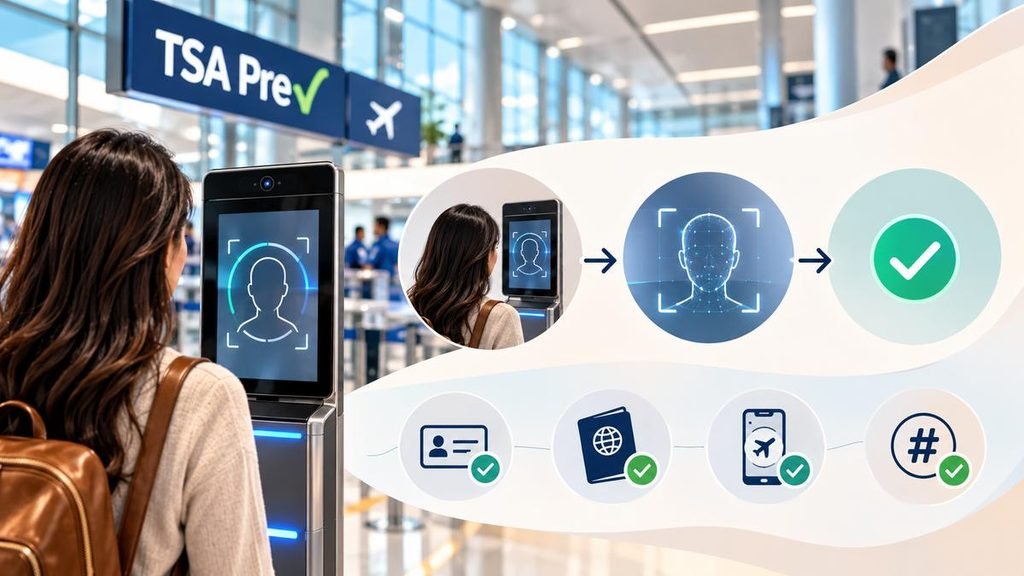
TSA PreCheck Touchless ID uses facial recognition technology to verify a traveler’s identity at participating TSA PreCheck security lanes. Instead of repeatedly handing over a driver’s license or passport, enrolled travelers look into a camera. At the same time, the system compares the live image with an identity image already associated with the traveler’s credentials.
TSA describes Touchless ID as an optional identity-verification experience for TSA PreCheck travelers flying on participating airlines. Its partner guidance says eligible travelers need a current TSA PreCheck membership, a valid passport, an active airline profile, and a Known Traveler Number.
The distinction is important:
- TSA PreCheck determines whether a traveler is eligible for expedited screening.
- Touchless ID provides a biometric way to verify the traveler’s identity at participating checkpoints.
- The airline handles the customer-facing opt-in process.
- The airport and checkpoint must have the necessary Touchless ID infrastructure.
So, Touchless ID does not replace TSA PreCheck. It sits on top of it.
For example, a traveler who already has TSA PreCheck but is flying from an airport without a Touchless ID checkpoint can still use the ordinary TSA PreCheck lane. The traveler simply will not receive the touchless identity-verification experience.
Do You Need TSA PreCheck Before Enrolling in Touchless ID?
Yes. A traveler must already have TSA PreCheck eligibility and a Known Traveler Number to use TSA PreCheck Touchless ID. TSA’s program guidance specifically identifies current TSA PreCheck travelers as an eligibility requirement.
This means the enrollment process has two stages.
Stage 1: Get TSA PreCheck
Travelers who do not already have TSA PreCheck need to apply through an authorized enrollment provider. Current TSA enrollment locations are offered through providers including IDEMIA, Telos, and CLEAR, with locations and fees varying by provider. TSA’s enrollment-center directory directs applicants to the relevant provider for appointment and location details.
Current provider pricing illustrates why travelers should check the enrollment site before paying:
| Provider | New enrollment information currently listed |
| IDEMIA | $76.75 for 5 years |
| Telos | $85 for 5 years |
| CLEAR | Pricing varies by enrollment arrangement |
IDEMIA currently lists a $76.75 new-enrollment fee for five years, while Telos lists $85 for five years. Available providers and pricing can change, so travelers should confirm the amount shown when starting an application.
Stage 2: Activate Touchless ID
Once TSA PreCheck is active, the traveler adds the KTN and passport information to an eligible participating airline account and opts into Touchless ID through that airline.
Many travelers overlook that second step.
What Do You Need Before Starting?
Before trying to activate Touchless ID, it is useful to have the following information ready:
- Active TSA PreCheck membership
- Known Traveler Number (KTN)
- Valid, unexpired passport
- Eligible airline loyalty account
- Matching personal information
- Airline mobile app, where required
- A flight departing from a participating airport
The name and date of birth in the airline profile should correspond with the traveler’s identity records. An incorrect KTN, mismatched name, expired passport, or incomplete profile can prevent the Touchless ID option from appearing.
Travelers should also make sure the passport number entered in the airline account is correct. For example, if a passport was recently renewed, the old passport number should not remain in the airline profile when you use the new passport for Touchless ID eligibility.
How To Enroll in TSA PreCheck Touchless ID With Delta
Delta’s implementation works similarly, but the program is connected to a SkyMiles account and the Fly Delta app.
Delta currently requires travelers to:
- Be a SkyMiles member
- Have TSA PreCheck and a KTN
- Have a valid, unexpired passport
- Store passport information and the KTN in the SkyMiles profile
- Use the Fly Delta app for the relevant travel experience
Step 1: Join SkyMiles
SkyMiles membership is free, and the account provides a profile where you can store passport and KTN information.
Step 2: Add passport information
Store the current passport information in the SkyMiles profile.
Step 3: Add the KTN
Enter the Known Traveler Number associated with the active TSA PreCheck membership.
Step 4: Opt in
Delta says customers can activate Touchless ID from their SkyMiles profile through Delta.com or the Fly Delta app.
Once activated, the preference can remain associated with the customer’s profile for future eligible trips. Delta says customers can opt out at any time.
Step 5: Check in through the Fly Delta app
Delta requires eligible travelers to check in through the Fly Delta app for the Touchless ID badge to appear on the mobile boarding pass.
The airline says customers should look for the appropriate Touchless ID indicators at the airport.
Is Touchless ID the Same as TSA PreCheck?
No. This is one of the most important points to understand.
TSA PreCheck is the trusted-traveler program that provides eligible passengers access to expedited screening procedures. Touchless ID is an optional biometric identity-verification layer that eligible PreCheck travelers can use at participating checkpoints.
A traveler could therefore have:
TSA PreCheck + no Touchless ID
or:
TSA PreCheck + Touchless ID
The first combination remains useful at thousands of TSA PreCheck checkpoints. The second adds facial matching where Touchless ID is available.
Touchless ID also does not mean that a traveler is exempt from security screening. TSA can still conduct screening, including unpredictable security measures. TSA’s published PreCheck information makes clear that expedited screening is not guaranteed for every traveler, every time.
How Does TSA PreCheck Touchless ID Work at the Airport?
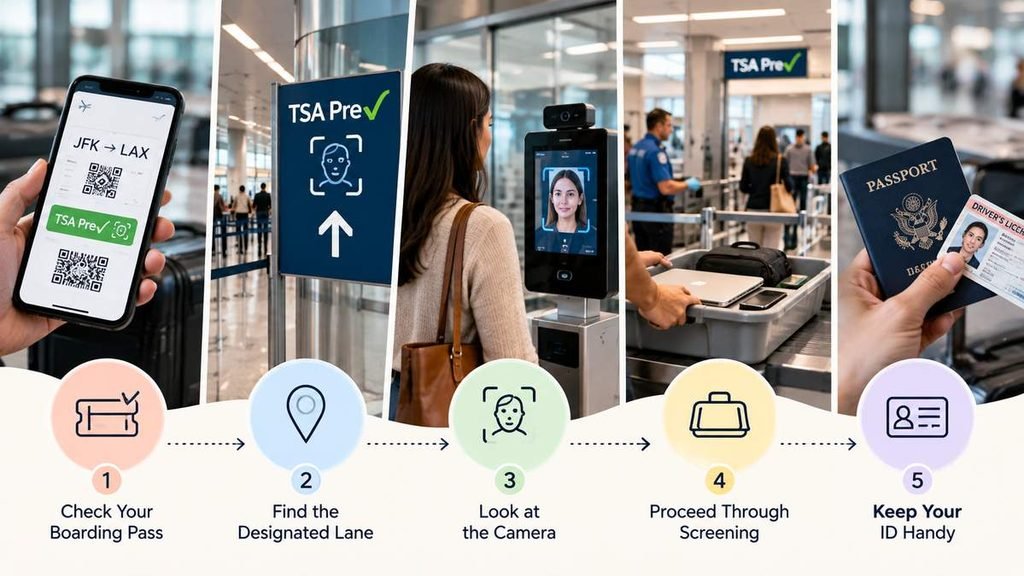
Once enrolled, the airport process is fairly simple.
1. Check the boarding pass
The traveler should confirm that the boarding pass shows the relevant Touchless ID indicator.
2. Find the designated lane
Follow airport signs for the TSA PreCheck Touchless ID checkpoint.
Not every TSA PreCheck lane has Touchless ID equipment.
3. Approach the camera
At the identity-verification point, the traveler looks toward the camera.
The system compares the live facial image with the appropriate identity record.
4. Proceed through screening
After identity verification, the traveler continues through the TSA PreCheck security process.
The key distinction is that Touchless ID does not remove standard TSA security screening requirements. It primarily changes how identity is verified.
5. Keep identification available
Even when using Touchless ID, travelers should carry their physical government-issued identification or passport.
Can Children Use TSA PreCheck Touchless ID?
The answer depends on the airline’s implementation.
The airline currently says children aged 17 and younger on the same reservation can accompany an eligible adult into its TSA PreCheck Touchless ID lane, but the children do not use Touchless ID themselves; their boarding passes are scanned.
Delta’s current guidance takes a different approach: each traveler who wants to use the biometric experience must individually meet the program requirements and opt in.
Families should therefore check the airline-specific rules rather than assuming that one adult’s Touchless ID enrollment covers everyone.
What Happens if the Facial Match Does Not Work?
A failed facial match does not mean the traveler loses TSA PreCheck.
Touchless ID is an identity-verification method, and the physical identification process remains available.
If the biometric system cannot establish a match, a TSA officer may conduct a manual identity check. Delta specifically states that customers may be asked to present government-issued identification or a passport, and its published materials describe manual inspection when a biometric match is not established.
This is why travelers should not leave their identification at home simply because Touchless ID appears on the boarding pass.
Is TSA PreCheck Touchless ID Safe and Private?
Privacy is an important consideration because Touchless ID uses biometric facial matching.
TSA’s Touchless ID partner guidance says biometric cameras are used for identity verification in the dedicated lane and that photos are deleted after use and are not shared or used for law-enforcement or surveillance purposes under the described program process.
The precise data flow can also vary by airline implementation.
For example, Delta says that when a traveler reaches a camera, the image is encrypted and transmitted through a secure channel to U.S. Customs and Border Protection’s facial biometric matching service for identity verification. Delta states that it does not store or save customer biometric information.
The important point is that participation is voluntary. Travelers who do not want to use biometric identity verification can continue using traditional identification procedures.
What If Touchless ID Does Not Appear on the Boarding Pass?
Several issues can cause this.
The KTN is missing
The airline account may not contain the correct Known Traveler Number.
The passport information is missing
Touchless ID generally requires a valid passport record to be associated with the eligible airline profile.
The name does not match.h
A mismatch between the TSA record, passport,t and airline profile can interfere with eligibility.
The airport is not participating
Even an eligible traveler cannot use Touchless ID where the necessary equipment is unavailable.
The airline is not participating in that journey
Touchless ID is linked to participating airline programs rather than being universally available to every TSA PreCheck passenger.
Check-in was completed incorrectly
Some airlines require mobile-app check-in before the Touchless ID indicator appears. Delta, for example, specifically requires eligible customers to check in through the Fly Delta app for the appropriate badge to appear.
TSA PreCheck vs. Touchless ID: What’s the Difference?
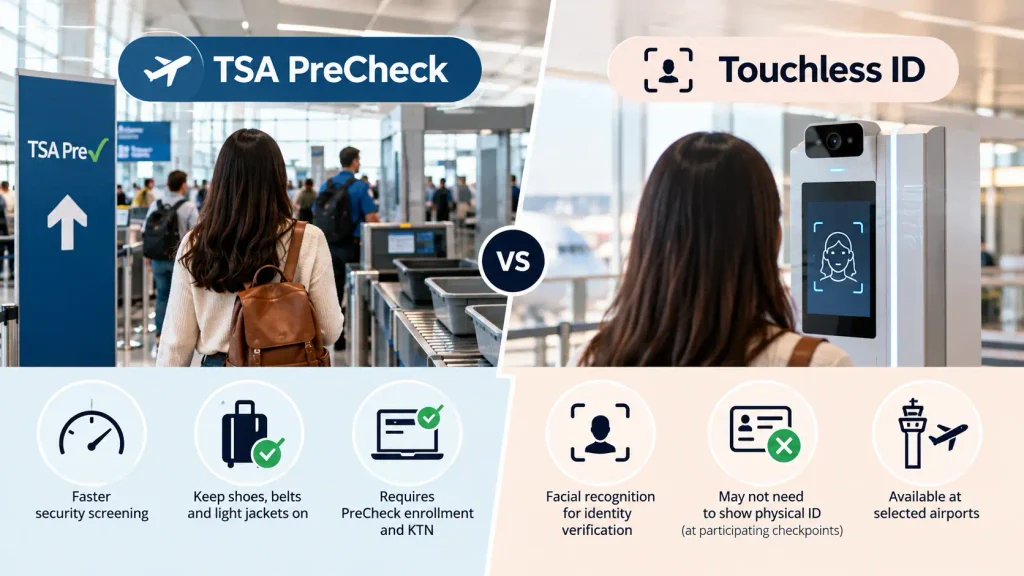
TSA PreCheck is a trusted-traveler program that provides expedited security screening, while Touchless ID is an optional facial-recognition identity verification feature for eligible PreCheck members. Touchless ID can reduce the need to present physical identification at participating checkpoints, but it does not replace TSA PreCheck enrollment.
| Feature | TSA PreCheck | TSA PreCheck Touchless ID |
| Main purpose | Expedited security screening | Biometric identity verification |
| Separate application | Yes | No separate TSA application |
| KTN required | Yes | Yes |
| Passport required | Not for all PreCheck enrollment situations | Generally required for Touchless ID |
| Airline account | Useful for adding KTN | Required with participating airline |
| Facial matching | Not the defining feature | Yes |
| Physical ID | Normally presented as required | May not be needed at participating Touchless checkpoint |
| Availability | Broad TSA PreCheck network | Selected airports/checkpoints |
| Participation | Membership program | Optional |
| Replaces security screening | No | No |
The practical takeaway is simple: TSA PreCheck gets the traveler into the expedited screening program; Touchless ID can make identity verification within that process more hands-free.
Does Touchless ID Replace a Passport or Driver’s License?
No. Touchless ID can reduce the need to present an identification document at the participating checkpoint, but travelers should still carry valid identification.
This becomes particularly important when an airport, airline, or TSA officer needs to perform a manual verification.
It is also important not to confuse TSA PreCheck Touchless ID with a mobile driver’s license. Delta explicitly identifies Touchless ID as a separate program from the TSA mobile driver’s license initiative.
Can Travelers Opt Out Later?
Yes. Touchless ID is voluntary, and participating airlines allow customers to turn off the feature.
Opting out does not cancel TSA PreCheck membership. The traveler simply returns to the conventional identity-verification process.
How Early Should Travelers Enroll Before a Flight?
Travelers should not wait until the morning of the flight to enroll in TSA PreCheck.
A new TSA PreCheck application requires an in-person enrollment appointment, document verification, fingerprints, and a photograph. While many applicants receive their KTN within several days, applications can take longer. Telos, for example, says most applicants receive a KTN in three to five days, although some cases can take up to 60 days.
Once TSA PreCheck is active, the Touchless ID opt-in itself is much faster because it is handled through the airline profile.
A sensible sequence is:
Apply for TSA PreCheck → receive KTN → add KTN to airline profile → add passport → opt into Touchless ID → check in through the required app → verify the boarding-pass indicator.
Doing this several days before departure gives you time to correct profile information if the option doesn’t appear.
Final Takeaway
TSA PreCheck Touchless ID is best understood as an optional biometric layer on top of TSA PreCheck, not a separate trusted-traveler program. The basic sequence is to obtain TSA PreCheck, keep the KTN and passport information current in a participating airline’s profile, opt in, check in as required, and then use the designated Touchless ID lane at an eligible airport.
Because Delta has different account requirements, airport coverage, and enrollment interfaces, travelers should verify the rules with the airline operating their next flight. They should also keep a physical ID available and confirm the Touchless ID indicator on the boarding pass before heading to security.
Frequently Asked Questions
There is no separate TSA PreCheck Touchless ID application fee. However, travelers must have TSA PreCheck, which has its own enrollment cost. Current provider fees vary, with IDEMIA currently listing $76.75 for a five-year new enrollment and Telos listing $85.
No. Global Entry is not required if the traveler already has TSA PreCheck and meets the participating airline’s Touchless ID requirements. Some travelers may receive TSA PreCheck benefits through other trusted-traveler programs, but check the airline’s current eligibility rules.
No. TSA’s current Touchless ID program guidance identifies an active TSA PreCheck membership as an eligibility requirement.
Generally, yes. TSA’s Touchless ID partner guidance lists a valid passport as an eligibility requirement, and Delta both currently require passport information in the participating airline profile.
Yes. Travelers can use traditional identification instead of Touchless ID, and airline guidance indicates that passengers may still be asked to provide identification.
No. Touchless ID changes identity verification; it does not eliminate TSA security screening.
The in-person enrollment appointment is generally short, but the total processing time varies. Telos says most approved applicants receive their KTN within three to five days, while some applications can take up to 60 days.
No. Touchless ID is available only at participating airports and checkpoints. Availability continues to expand, so travelers should check the current airline-specific airport list before departure.
No. Participation is optional. Travelers can continue using conventional identification procedures.