
Earn a 30% Bonus on Your First Purchase via Virgin Atlantic’s Shops Away Portal
Virgin Atlantic’s Shops Away portal offers eligible Flying Club members a 30% bonus on the Virgin Points earned from their first qualifying purchase through the shopping portal, subject to the promotion’s terms and conditions. The bonus is added to the standard points earned from an eligible transaction, providing an extra opportunity to build a Virgin Points balance through everyday shopping.
Shops Away connects members with participating online retailers and selected in-store offers. Rather than shopping directly with a retailer, members access the merchant through the portal or follow the applicable in-store offer process to earn points. The retailer’s own purchase conditions still apply, and excluded expenses such as gift cards, taxes, and delivery charges do not qualify for the first-purchase bonus.
The offer is particularly relevant to members planning a purchase that already fits their needs. Before using it, it is important to understand how the bonus is calculated, how to activate tracking, which transactions qualify, and when points are expected to appear.
Offer status: Virgin Atlantic’s official Shops Away terms currently describe the 30% first-purchase bonus, but the airline reserves the right to change or withdraw the promotion. Eligibility and terms should be checked on the official portal before making a purchase.
What Is the Virgin Atlantic Shops Away 30% Bonus?
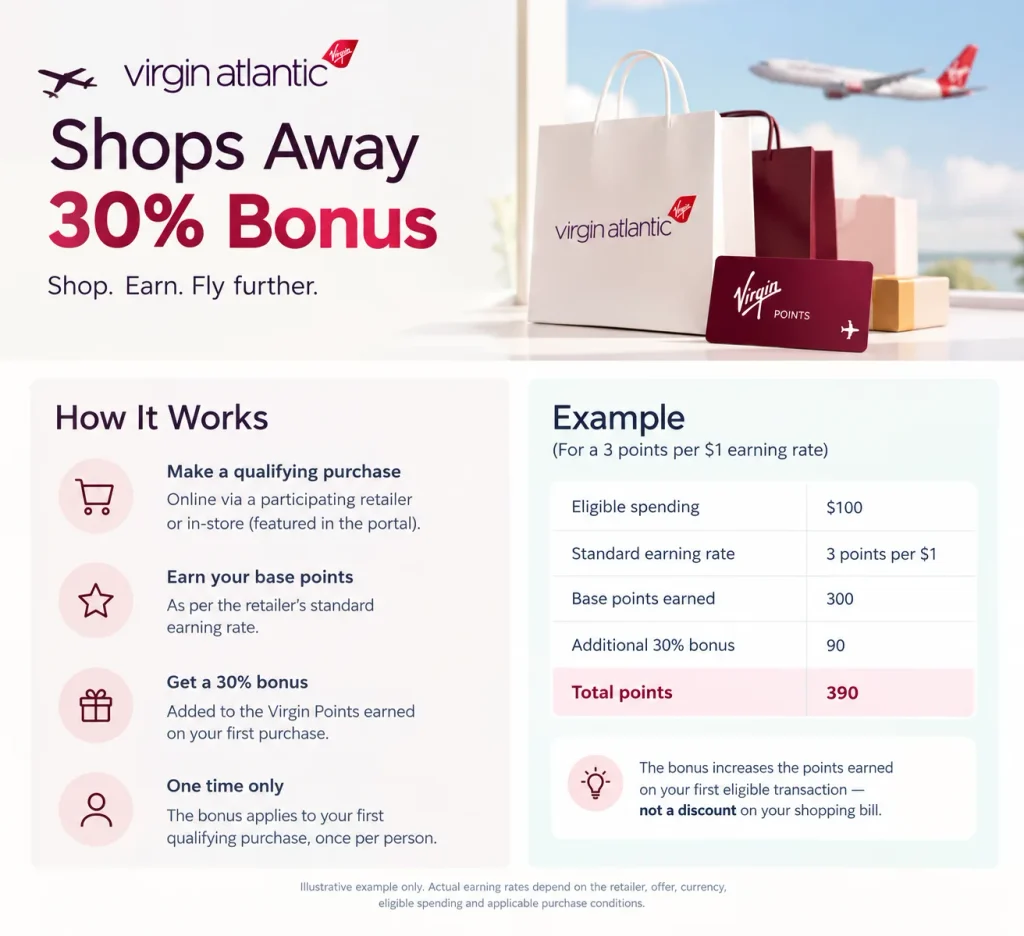
The promotion gives an eligible member an additional 30% of the standard Virgin Points earned on their first qualifying Shops Away purchase. It is a bonus on points—not a 30% discount on the shopping bill.
The offer applies to a qualifying first purchase made either online through a participating retailer accessed via Shops Away or in-store with a retailer featured in the portal’s in-store shopping section. The bonus can be earned only once per person.
How the 30% Bonus Works
The bonus is calculated from the Virgin Points earned on the eligible purchase, rather than from the total amount spent.
For example, if a participating retailer offers 3 Virgin Points per dollar and a qualifying purchase earns 300 base points, the 30% bonus would add 90 points.
| Calculation | Virgin Points |
| Eligible spending | $100 |
| Standard earning rate | 3 points per $1 |
| Base points earned | 300 |
| Additional 30% bonus | 90 |
| Total points | 390 |
Illustrative example only. Actual earning rates depend on the retailer, offer, currency, eligible spending, and applicable purchase conditions.
The key distinction is that the bonus increases the points earned on the first eligible transaction. It does not mean that every future Shops Away purchase automatically earns 30% extra points.
Explore More: Chase Sapphire Cards Get a New Chapter: Perks, Bonus Categories & 2026 Changes
Who Can Earn the First-Purchase Bonus?
The promotion is intended for members who have not previously earned the one-time bonus. A valid Virgin Atlantic Flying Club account is required to earn Virgin Points through Shops Away.
Before shopping, eligible members should:
- Sign in to the relevant Virgin Atlantic Flying Club account.
- Open Shops Away through the official Virgin Atlantic website.
- Check that the retailer is participating and the offer is available.
- Review the retailer’s earning rate and purchase restrictions.
- Complete the transaction through the required shopping link or in-store offer process.
Virgin Atlantic’s terms state that the bonus can be awarded only once per person and that purchases outside the promotion’s applicable terms do not qualify.
How to Earn the 30% Bonus Through Shops Away
The online shopping process is straightforward, but the correct referral path matters because the portal uses tracking to attribute purchases.
Step 1: Sign In to the Flying Club Account
Visit Virgin Atlantic and sign in to the relevant Flying Club account. Access Shops Away through the account-linked shopping page.
A qualifying purchase made without the required sign-in and referral process may not earn points.
Step 2: Choose a Participating Retailer
Browse the available retailers and review the points offered for eligible purchases. Earning rates and conditions can vary by merchant, product, customer type, and promotion.
A retailer’s offer page may also specify exclusions, coupon-code rules, or minimum spending requirements.
Step 3: Select “Shop Now”
Use the portal’s Shop Now link to reach the retailer’s website. This click establishes the referral needed to track the purchase.
The retailer’s website should be opened through this route for each shopping session.
Step 4: Complete the Purchase in the Same Session
Complete the transaction on the retailer’s website while the tracking session remains active.
To reduce the risk of losing points:
- Keep browser cookies enabled and accept the retailer’s applicable cookie settings.
- Avoid clicking another shopping portal or promotional referral before checkout.
- Use only coupon codes permitted by the Shops Away offer.
- Avoid switching to the retailer’s app unless the offer specifically allows app purchases.
- Start a fresh portal session if additional items need to be purchased separately.
These precautions help ensure that the purchase is attributed to Shops Away.
Step 5: Wait for the Purchase to Be Approved
Qualifying online purchases generally appear as pending in the account’s purchase history within five working days. The merchant must then validate the transaction before the points are approved.
Virgin Atlantic’s current Shops Away guidance says approval can take up to 45 days for many purchases, and 90–120 days for hotel and travel bookings or certain policy, contract, and subscription purchases. Some transactions may take longer.
The 30% bonus is credited after the applicable merchant approves the purchase, with the promotion terms indicating that the bonus is generally credited within 24 hours of approval.
Which Purchases Qualify—and Which Are Excluded?
Not every transaction made with a participating retailer qualifies for the bonus. The purchase must follow the portal’s referral process and meet both the promotion terms and the retailer’s conditions.
| Purchase or expense | Bonus eligibility |
| First qualifying online purchase through Shops Away | Eligible, subject to terms |
| First qualifying in-store purchase featured in Shops Away | Eligible, subject to the in-store offer terms |
| Gift cards, gift certificates, and similar cash equivalents | Excluded |
| Taxes | Excluded |
| Delivery charges | Excluded |
| Purchase later cancelled or refunded | Points and bonus are not awarded or may be removed |
| Purchase made outside the promotion period | Not eligible |
| Purchase using an unapproved coupon code | May invalidate points |
These exclusions are specified in Virgin Atlantic’s official promotion terms and Shops Away guidance. Individual retailers may impose additional restrictions.
Do Gift Cards Earn the 30% Bonus?
No. The official terms exclude purchases of gift vouchers, gift cards, gift certificates, and similar cash equivalents from the bonus. Taxes and delivery charges are also excluded.
What Happens if an Order Is Returned or Canceled?
A cancelled or returned purchase does not qualify for the bonus. Virgin Atlantic’s terms state that neither the bonus nor the standard Virgin Points will be awarded for a purchase that is subsequently canceled by the customer or merchant. If points have already been credited, they may be removed in accordance with the applicable terms.
Can the 30% Bonus Be Earned In-Store?
Yes. The official promotion terms include qualifying purchases at retailers featured in Shops Away’s in-store shopping section. However, in-store offers use a different process from online shopping.
Members generally need to sign in, register an eligible payment card, and check the current in-store offers. The card may take up to 24 hours to become active for tracking. A qualifying purchase must then be made with the registered card and meet the individual merchant’s conditions.
Before visiting a retailer, it is worth checking whether the specific offer is available to the account and which payment methods qualify. Not every retailer or payment card is eligible.
Also Worth Reading: Get 80,000 Points With the Southwest Business Card
How to Maximize the First-Purchase Bonus
The most effective approach is to use the bonus on a planned, eligible purchase rather than spending more solely to earn points.
Choose a Purchase With a Strong Base Earning Rate
The bonus is calculated from the standard points earned. A retailer offering a higher eligible earning rate can therefore generate a larger bonus on the same qualifying spend.
For instance, a $100 purchase earning 5 points per dollar would generate 500 base points and a 150-point bonus, for 650 points in total—assuming the entire $100 qualifies and the merchant’s offer permits that calculation.
Check the Retailer’s Terms Before Checkout
Retailer offers can differ in their minimum spending requirements, coupon restrictions, eligible products, and treatment of new or existing customers. The rate shown on the retailer’s Shops Away page should be checked immediately before purchase.
Compare the Final Price With Other Retailers
The points bonus does not automatically make a purchase the best deal. A retailer with a lower earning rate may still offer a better overall price, especially when another store has a substantial discount.
A sensible comparison considers the final cash price, shipping, return conditions, and the value of the Virgin Points earned.
Preserve the Tracking Session
The referral process is essential. Cookies, unsupported coupon codes, switching shopping portals, or completing the transaction in a retailer app may interfere with tracking. Following the official portal’s instructions improves the likelihood that the purchase will be recorded correctly.
What Can Virgin Points Be Used For?
Virgin Points earned through Shops Away are credited to the member’s Virgin Atlantic loyalty account. They are not a separate shopping currency that can be used to pay for merchandise directly through the portal.
Virgin Points may be redeemed for eligible Virgin Atlantic reward flights, upgrades, and other rewards available through the loyalty programme, subject to the applicable rules and availability.
The value of a points balance depends on the redemption selected. A bonus is most useful when the points contribute toward a realistic future redemption rather than encouraging unnecessary spending.
Related: How Virgin Atlantic’s Different Upper Class Cabins Compare
Final Thoughts
The Virgin Atlantic Shops Away 30% first-purchase bonus can provide an additional boost to a Flying Club balance when a planned purchase qualifies. The main priorities are to verify that the promotion is active, choose a participating retailer with a competitive earning rate, and follow the portal’s tracking process from sign-in through checkout.
The bonus is a one-time points incentive, not a shopping discount. Comparing the retailer’s final price and purchase conditions—and confirming that the points have tracked correctly—helps ensure that the extra Virgin Points are worth pursuing.
Frequently Asked Questions
Virgin Atlantic’s official Shops Away terms currently describe the 30% first-purchase bonus. However, the airline reserves the right to alter, suspend, or withdraw the offer, so its availability should be checked before shopping.
No. The offer provides extra Virgin Points based on the eligible points earned from the first qualifying purchase. It does not reduce the amount charged by the retailer.
The promotion is not limited to newly created Flying Club accounts in the terms reviewed. Eligibility depends on whether the individual has already received the one-time bonus and whether the purchase meets the offer conditions. The bonus can be earned only once per person.
No. The official terms state that the bonus can be earned only once per person. Later qualifying Shops Away purchases may still earn the retailer’s standard points, but not another first-purchase bonus.
Eligible online purchases generally appear as pending within five working days. Merchant approval can take up to 45 days for many purchases and longer for some travel-related transactions. The additional bonus is generally credited within 24 hours after the merchant approves the purchase.
Yes. Using a coupon or voucher code that is not listed or permitted by Shops Away can invalidate the transaction’s points. The retailer’s offer conditions should be checked before applying a code.